Friday, 17 August 2012

Windows 8 - First Impressions from Assured Systems

Windows 8 will be the latest in a long line of operating systems (OS) from market leader Microsoft.  The OS is designed for use on computers of all types including desktops, laptops, home theatre computers, multimedia devices, and more.  It is part of the Windows NT family of operating systems and succeeds the successful Windows 7 system.  Windows 8 will be available in four major editions: Windows 8, Windows 8 Pro, Windows 8 Enterprise, and Windows RT. The first three have almost the same hardware requirements as that of Windows 7. The latter, however, runs on tablet computers with ARM architecture and has different hardware requirements such as mobile or embedded devices.

Windows 8 is built using the Modern UI, previously Metro, typography-based design language created originally for use in Windows phones.  One of the key fundamental design features is a better focus on the content of applications rather than the graphical user interface (UI).  Microsoft’s design team report influences such as public transport signs for the UI, placing emphasis on good typography and large text which catches the eye; the result is a modern, clean and fast way of selecting where you wish to go on your device.  Flat coloured ‘live tiles’ are used which include stylised text and logos, making navigation very simple.  Each tile represents an application and can display information about that application, such as the date, time, unread messages, temperature, etc.

The start button is now featured alongside the tiles, known as ‘Charm bar’ which is the universal toolbar of Windows 8, and which you can access from anywhere no matter which application you are working in. There are two ways to enter the Charm Bar; firstly, by dragging your mouse pointer to the top or bottom right corner of the screen, or alternatively you can press the Windows+C button on your computer to invoke the bar.  We like the interface and think it offers a refreshing change to the traditional icon based systems of the past.  Clearly, Apple’s iPhone/iPad lead the way in such an intuitive interface, and perhaps it could be said Microsoft’s design team have made it more modern and interesting; however, only time will tell if the layout becomes irksome as the amount of applications on your devices increase.

Windows 8 'Modern UI' - note the 'Charm Bar' down the right hand side
Windows 8 Mail App
Windows 8 System Setting Screen
Windows 8 Desktop - note the start button is now missing

Hardware requirements of Windows 8 are similar to Windows 7, which is good news for industrial and embedded users whose systems typically sit further down the chain than those of consumer grade computers. To run a single Modern UI ‘App’ you’ll need a display with at least 1024x768 resolution, or to run two simultaneous ‘Apps’ side by side a resolution of 1366x768 or higher.  Minimum processor hardware specs are as follows:


Architecture
32-bit
64-bit
CPU
1GHz
1GHz
RAM
1GB
2GB
Graphics
DirectX 9 with WDDM 1.0 or higher
Storage
20GB
20GB


Microsoft has also released information on tablets or mobile computers, defined as standalone devices which combine a PC and display, alongside integrated pointing device.  This is poignant in our industry, as this OS will be installed on our rugged tablets, panel computers and touchscreen systems.  The touchscreen must be a minimum of 5-point touch and have a resolution of 1366x768 or higher.  Interestingly, to receive Microsoft’s certification, the device must also resume from standby in 2 second or less.

We’ve run some basic benchmarking tests on the same machine running both Windows 7 and Windows 8, and we’re impressed with how the new OS stacks up against its predecessor.  Boot up times were faster, applications loaded quicker, and general responsiveness of the Windows 8 machine was impressive.  Below you can see our benchmarking figures which were run on one of our NDiS 125-L multimedia computers using 32-bit versions of both OSs with the following spec:

NDiS 125-L Fanless Multimedia Computer
Intel Atom D525 1.8GHz Dual Core CPU
Nvidia ION2 GPU
2GB DDR3 Memory
60GB SATAIII Solid State Drive

Benchmarking tests for Windows 7 v Windows 8 on an embedded computer

Windows 8 will go on general release on October 26th 2012.  For those wishing to upgrade, the path will be straight forward for Windows 7 users as all user settings, personal files and apps will remain in tact during the process.  Windows Vista users will find user settings and personal files ported, and Windows XP users will find personal files remain in tact.  The upgrade cost will be around £30 to £50 depending on what you’re upgrading from and to.  There is also a special offer for those with new computers pre-installed with Windows 7 Pro purchased between June 2nd 2012 and January 31st 2013, which will cost around £10 (Windows 7 Starter and Enterprise are not included).

If you would like to discuss your project or application in more detail please contact technical sales on 01785 87 90 50 or email us at sales@assured-systems.co.uk.  For more information on Assured Systems please visit our website at www.assured-systems.co.uk.

Tuesday, 19 June 2012

Assured Systems Discusses the Advantages & Disadvantages of HDD v SSD

In computer history, hard disk drives (HDDs) have been around since the dawn of time.  In the 1950s IBM developed hard drives the size of a small car for super computers used by the US government (and some industrial customers) offering, wait for it, 3.75MB of storage space.  Developments continued and by the 80s PC hard drives started to be standardised into the 3.5" and 2.5" formats we see today.  Drive interfaces have also changed over the years, but still perform the same task of connecting the drive to the computer and allowing data transfer to ever increasing capacities; at the time of writing 3.5" drives max out at 4TB and 2.5" at 2TB.

One of IBM's First HDDs Back in the 1950s

If the HDD is the old man, the Solid State Drive (SSD) is the new kid on the block.  There have been experiments with solid state systems over the years, but nothing which was able to knock the trusty HDD off it's perch.  Until now, perhaps.  Standard HDDs contain multiple disks called platters, which are covered in a magnetic coating and then rotated at high speed. Drive heads then move across the platters, changing the magnetisation of the material beneath to record data, or reading its state to return the stored information.  SSD technology uses flash memory chips to store data, a much simpler design with no moving parts. Both solutions perform the same tasks; storing your OS, booting your system, storing and manipulating applications and files.

An SSD & Traditional Spinning HDD

As we've identified both HDDs and SSDs are essentially offering us the same functionality, we can now consider the advantages and disadvantages with both technologies.

Price
This has been one of the main reasons holding SSDs back from the mass market.  We've been using flash storage in embedded systems for many years; Disk On Chip, Disk On Module, and Compact Flash are all examples of flash storage used to improve the robustness of systems in harsh environments - but these disks were traditionally very small in terms of capacity, and normally more expensive than an HDD twenty times its size.  This is still true of today's market pricing; however, we are now getting to a stage where a reasonable size SSD (let's say 32GB+) is available for the same price as the lowest capacity HDD. Often these capacities are fine for industrial/embedded customers as they don't need Terrabytes of data storage.  So price isn't such an issue these days, depending on your application of course.

Speed
This is the SSDs pièce de résistance.  A machine with an SSD will boot in seconds, a traditional drive requires time to reach operating speed.  Also, over time an HDD can become slower due to factor such as fragmentation.  An SSD doesn't suffer these problems, and can access data no matter where it's stored in lightening fast time.  SSDs are inherently faster by design, and will access applications and files much quicker, meaning systems are more effective and reliable at performing their duties.

OCZ's Marketing Label Supplied with SSDs
Power Consumption
SSDs don't have motors or drive heads to move around the disc, thus power consumption is significantly less for an SSD versus an HDD.  This is an important factor for embedded systems, as less power means less heat; we can also consider battery operated systems, less power means a more efficient use of batteries.

Durability
With no moving parts, naturally SSDs are very robust when compared to traditional HDD.  This is one of the major benefits for using SSDs in embedded and industrial computer systems.  Harsh environments can mean systems are subjected to shock, vibration and rough treatment from operators.  Whilst HDD technology has improved drastically over the years, systems in 24/7 use benefit hugely from the use of SSD technology.  As far as longevity is concerned, it is true that SSDs wear out over time due to flash cells having a limited number of write cycles; however, with TRIM technology being built into the SSD, optimising read/write cycles, the system's MTBF figures are normally more than the likely life of the system itself.  There are some applications where we need to consider requirements carefully - high speed data acquisition, for example, may be writing many times a second, causing problems for the SSD much sooner than designed for.

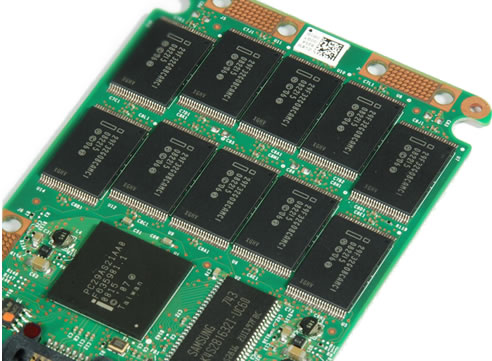
Flash Chips Used in SSDs Mean No Moving Parts 
Conclusion
I think our discussion is fairly conclusive that the features of SSDs are very attractive to customers in the industrial/embedded computer space, and whilst there are still factors to consider, it's definitely now something worth considering when specifying a system for your next project.  Here at Assured Systems, we're building 75% of our systems with SSDs as standard, offering an HDD as an option to customers who need higher capacities, or have applications which demand a lot of write cycles.  Our experienced technical sales team can discuss your application in-depth and decide on the best solution for you, at a price point to meet your budget.

If you would like to discuss your project or application in more detail please contact technical sales on 01785 87 90 50 or email us at sales@assured-systems.co.uk.  For more information on Assured Systems please visit our website at www.assured-systems.co.uk.

Friday, 8 June 2012

Which Industrial LCD Monitor is right for your application?

Assured Systems offers an unmatched range of LCD display solutions designed for industrial, embedded and OEM applications. Designed to operate under the harshest conditions and with the widest range of product configurations on the market, we have a display for almost any environment. Whether you require a simple open frame design, a vehicle mount display or an outdoor product with sunlight readable display and fully sealed enclosure, Assured Systems can help. All our products are designed with a focus on reliability and long-term availability, allowing you total confidence when choosing Assured Systems for your product design.
A SureRack Industrial Computer paired with 21" IP65 Panel Mount Monitor

The aim of this blog is to explain to our customers the differences between display formats, such as Open Frame LCD Monitors, IP65 Panel Mount Monitors, Chassis Mount Monitors, Rackmount Monitors, Fully Sealed IP66 Monitors, Sunlight Readable LCD Monitors and Marine LCD Monitors.

Open Frame LCD Monitors
Our range of Open Frame LCD Monitors feature an open frame bezel offering customers maximum flexibility for the design and look of their final product. Mounting from the inside, they offer a flush fitment for the OEM finish required by many clients. A wide range of display sizes, video inputs and touchscreen options ensures we have a product for every application.

A Typical Open Frame LCD Monitor

Panel Mount LCD Monitors
Our range of Panel Mount Monitors feature a bezel designed to mount into an aperture in your design, making a neat installation in existing sheet metal very easy.  We offer two levels of panel mount monitors for industrial environments: a range which conforms to IP65 standards for water and dust resistance, making these products ideal for rugged industrial environments; and a range of panel mount solutions which are not sealed, ideal for cleaner industrial environments where moisture and dust isn't an issue.  Bezels are offered in mild steel, CNC machined aluminium, or stainless steel for pharmaceutical or food applications where a full wash down is required. A wide range of display sizes, video inputs and touchscreen options ensures we have a product for every application.


An IP65 Panel Mount LCD Monitor
Chassis Mount LCD Monitors
Our range of Chassis Mount LCD Monitors feature a full metal enclosure and mount using VESA fixings on the rear of the design. These monitors are ideal for applications where a fully housed rugged monitor is required.  A wide range of display sizes, video inputs and touchscreen options ensures we have a product for every application.

A Chassis Mount LCD Monitor


Rackmount LCD Monitors
Our range of Rackmount LCD Monitors are designed for use with industry standard 19" rack cabinets. We offer a wide range of LCD sizes to fit most applications, from 8" and above.  We can also offer a range of solutions with integrated keyboard, trackball and KVM.  Optional video inputs and touchscreens ensures we have a product for every application.

Rackmount LCD Monitor

Fully Sealed IP65/IP66 Weatherproof LCD Monitors
Our range of IP65/IP66 Weatherproof LCD Monitors feature a fully sealed, six-sided weatherproof enclosure designed for applications where high levels of moisture and dust are present. These systems are available with optional stainless steel housing for food-grade applications, or extended temperature design with sunlight readable display for outdoor projects. VESA standard mounting on the rear of the design allows for easy installation via industry standard mounting solutions.

A Fully Sealed IP66 LCD Monitor

Sunlight Readable LCD Monitors
Our range of Sunlight Readable Monitors are designed for use where high ambient light affects the function of standard LCD displays, such as outdoor or mobile applications. We offer two technologies for this problem; transflective and high-brightness. These technologies are available integrated into all our mounting formats such as IP65 panel mount, open frame, chassis mount, and fully IP66 sealed enclosures, alongside various touchscreen options.

Sunlight Readable LCD Monitors
Marine LCD Monitors 
Our range of Marine LCD Monitors are designed for use on maritime bridge and control applications where customers require a rugged display interface with options such as transflective or high brightness for sunlight readability, 0 to 100% brightness control, easily accessible front mounted controls, IP65 water resistance, wide voltage input to connect to the on-board power system, and anti-corrosion properties. Some of the monitors are already tested to DNV standards and are ready for type testing on-board a vessel.

A Marine LCD Monitor


If you would like to discuss your project or application in more detail please contact technical sales on 01785 87 90 50 or email us at sales@assured-systems.co.uk and one of our qualified sales team will be happy to offer advice on the technology that best fits your project.

About Assured Systems
Assured Systems is a leading British technology company offering high quality and innovative applied computing solutions to the embedded, industrial, and digital-out-of-home markets across the United Kingdom and Ireland.

Did you know you can use Outlook or another email application to subscribe to our blogs? Click here to subscribe!

Friday, 30 March 2012

Touchscreen Technology Explained by Assured Systems

Touchscreen devices are everywhere to be seen these days, largely thanks to the advent of smartphones and tablet computers from the highly desirable Apple conveyor belt.  However, prior to the explosion in the consumer market, the touchscreen has long been a staple component in Industrial computing applications such as factory automation and control.  These traditional arenas tended to demand certain types of touch technology, however, as their popularity has increased in the mass market, so has the amount of technology types in which we have to choose from.

Assured Systems recognises that this makes for a difficult decision when choosing your hardware, so we’ve compiled a guide to the main technologies identifying their features & benefits.


Resistive
Resistive touchscreen technology is composed of two flexible sheets coated with a resistive material and separated by an air gap or microdots.  When these element touch together, they register the precise location and enable the connected computer to determine which part of the screen has been touched and undertake the appropriate instruction.  As resistive technology requires physical contact, the touchscreen senses inputs from any input device.

Features  
Can be sealed to IP65
Fast touch response
Finger, fingernail, gloved hand, pen, swipe-card, or any other stylus activation
Excellent durability (5-Wire or above)
Continues to work with liquids and other contaminants on the screen
Competitive price point

Main Limitations 
Does not scale to large displays easily
Not recommended for sunlight readable transflective displays
Susceptible to vandalism, can be scratched


Surface Wave  
Surface acoustic wave (SAW) technology uses ultrasonic waves that pass over the touchscreen panel. When the panel is touched, a portion of the wave is absorbed. This change in the ultrasonic waves registers the position of the touch event and sends this information to the controller for processing.

Features
Pure-glass touchscreen for superior image clarity, brightness, and light transmission 
Scalable to larger screen displays
Can be sealed to IP64 
Durable, scratch-resistant glass surface 
Unaffected by static water droplets and scratches on the screen 
Touch response faster than human perception 
Finger or gloved-hand activation 

Main Limitations
Can be susceptible to electrical noise
Some SAW touchscreens can only be sealed to IP54


Infrared
An infrared touchscreen uses an array of X-Y infrared LED and photodetector pairs around the edges of the screen to detect a disruption in the pattern of LED beams. These LED beams cross each other in vertical and horizontal patterns. This helps the sensors pick up the exact location of the touch. A major benefit of such a system is that it can detect essentially any input including a finger, gloved finger, stylus or pen.

Features
Shock resistant
Can be sealed to IP65 
Finger, gloved-hand, or any other stylus activation 
Stable, drift-free operation for an accurate touch response
Operation unaffected by direct sunlight (used in new touch based Amazon Kindle)

Main Limitations
Cost to manufacture bezel
Susceptible to false activations from surface contaminants 


Surface Capacitive
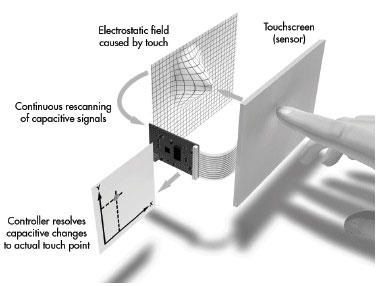
A capacitive touchscreen panel consists of an insulator such as glass, coated with a transparent conductor such as indium tin oxide (ITO). As the human body is also an electrical conductor, touching the surface of the screen results in a distortion of the screen's electrostatic field, measurable as a change in capacitance.  From this, the attached computer can register the precise location and enable the connected computer to determine which part of the screen has been touched and undertake the appropriate instruction.

Features
Excellent Image Clarity
Can be sealed to IP65
Sensor resistant to scratches and abrasions. 
Continues to work with liquids and other contaminants on the screen
Controller responds to quick, light touches, and operates drift-free even in areas of poor grounding.

Main Limitations
Requires finger touch or specialist glove
Not easily scalable to larger displays


Projected Capacitive 
Projected Capacitive Touch (PCT) technology is a variant of capacitive touch technology. All PCT touch screens are made up of a matrix of rows and columns of conductive material, layered on sheet of glass. This can be done either by etching a single conductive layer to form a grid pattern of electrodes, or by etching two separate, perpendicular layers of conductive material with parallel lines or tracks to form a grid. Current applied to this grid creates a uniform electrostatic field, which can be measured. When a conductive object, such as a finger, comes into contact with a PCT panel, it distorts the local electrostatic field at that point. This is measurable as a change in capacitance. If a finger bridges the gap between two of the "tracks", the charge field is further interrupted and detected by the controller. The capacitance can be changed and measured at every individual point on the grid (intersection). Therefore, this system is able to accurately track touches.

Features
Perfect for outdoor applications offering protection against the elements
Scalable to larger displays
Still operational when glass scratched or broken (often seen in iPhones which have been neglected!)
Can be used in conjunction with Perspex or vandal resistant glass up to 18mm thick
True flat front surface without bezel possible for aesthetically pleasing designs
Multi Touch Capability offering touch gesturing feature 

Main Limitations
Periodic recalibration can be required


Assured Systems offers the full complement of touch technologies described above through our wide range of LCD products, available in a variety of different mechanical designs, including open frame, panel mount (IP65), rack mount or Chassis Mount (VESA).  If you would like to discuss your project or application in more detail please contact technical sales on 01785 87 90 50 or email us at sales@assured-systems.co.uk and one of our qualified sales team will be happy to offer advice on the technology that best fits your project.

About Assured Systems
Assured Systems is a leading British technology company offering high quality and innovative applied computing solutions to the embedded, industrial, and digital-out-of-home markets across the United Kingdom and Ireland. Our impressive product portfolio includes a full range of Fanless Embedded Computer Systems, Digital Signage & Multimedia Computer Systems, Touchscreen Panel PCs, Human Machine Interfaces, Vehicle Mount Computers, Rackmount Computer Systems, Single Board Computers, Rugged Laptops & Tablets.

Did you know you can use Outlook or another email application to subscribe to our blogs? Click here to subscribe!

Tuesday, 14 February 2012

Windows Embedded Explained by Assured Systems


There can be no-doubt that Microsoft’s Windows® operating system is just about everywhere. Recent statistics from Net Applications suggest Windows currently accounts for 92% of the desktop operating system market. The certain majority of application developers are very familiar with Windows and would prefer to develop for the system of which they have become so acquainted, and the latest version of Windows Embedded OSs make this easy.

What is Windows Embedded?
Windows Embedded is a family of componentised Microsoft operating systems designed for use in environments where the full desktop version of the Windows operating system is either not necessary or not practical. It suits a variety of different markets, including the Industrial, Digital Signage, Mobile Computing and Transportation markets. Certain Windows Embedded variants also include embedded enabling features such as Enhanced Write Filter (EWF), Hibernate Once/Resume Many (HORM) and USB Boot.

All versions of Windows Embedded have a long support cycle, so you’re safe in the knowledge that no matter what happens, your investment will be supported for some considerable time.  The table below shows Microsoft’s current support schedule:


Why choose Windows Embedded?
The main reason our customers choose Windows Embedded is because of the level of customisation which can be achieved. Features which are not required can be removed from the build, which produces a faster, more secure system with a smaller footprint – ideal for embedded devices. The Standard 7 development kit also comes with a Footprint Estimator Tool, which can tell you how much disk space your final image is likely to require.

Embedded is also compatible with many existing Windows 7 desktop programs. The core architecture is the same, so you can use most applications on Windows Embedded Standard 7 just as you would on any Windows 7 PC. This negates the need for additional application development, saving you both time and money.

Licensing costs are also lower with Windows Embedded compare with its desktop counterpart; Windows 7 Professional is currently priced at around £140 whilst Windows Embedded Standard 7 is priced at around £85. That means a saving of over 40% in licencing costs alone.

Windows Embedded Compact 7 (Previously Windows CE)
Windows Embedded Compact 7 is the next generation of Windows CE. Compact is a real-time operating system, design for use in a wide range of small footprint devices. Compact is often used as a base for many of the following devices:

>Personal Navigation GPS devices
>Ruggedized Handheld Terminals
>Home and commercial building automation gateways
>Industrial Controls
>Vending Kiosks
>Mobile Point of Service devices
>Health Monitoring Devices
>Remote metering and monitoring devices

Compact 7 also comes with many new features, as detailed below:


An install of Compact 7 can be as small as 500kb, with 32bit support for ARM, MIPS and x86 processors. It also seamlessly connects to PCs, servers and online services.

Windows Embedded Standard 7 SP1 (Previously Win XPe)
Windows Embedded Standard 7 SP1 is the componentised version on the Windows 7 desktop operating system. It supports x86 and x64 processor architectures, as well as being fully compatible with existing Windows 7 based applications. Standard 7 also introduces features specific to the embedded market, such as Write Filter Technologies, Hibernate Once Resume Many (HORM) and SD Boot.

Write Filter Technologies
Standard 7 comes with two write filter technologies – File Based Write Filter (FBWF) and Enhanced Write Filter (EWF). Both systems protect the configuration of your embedded device by preventing any changes to the system from being stored to the disk, by storing changes directly into RAM or a specified disk cache. If your system is altered beyond the original configuration, all it takes to restore it is a simple reboot. Enhanced Write Filter prevents any changes from being permanently stored anywhere on the system. File Based Write Filter however will allow changes to files and/or directories which you specify, and these changes will persist after the system is rebooted.

Hibernate Once Resume Many (HORM)
Hibernate Once Resume Many works in conjunction with EWF to both protect your system and reduce boot times. It allows a system to start from a hibernation file rather than a complete boot of the operating system. This increases the cold-boot times for your system dramatically, which is particularly useful for digital signage applications following any power outages.

SD Boot
A new feature in Windows Embedded Standard 7, SD Boot allows your system to boot from a Secure Digital High Capacity (SDHC) card. This allows many compatible embedded devices to use an SD card as the primary drive rather than a traditional hard disk or newer solid state drive (SSD). This is an exceptionally useful feature where space within the device is limited, where the reliability of a traditional disk is insufficient or where the price premium of an SSD is unwarranted.

Footprint
The footprint for Standard 7 can be as little as under 600MB for an eCore installation. This enables you to use Windows Embedded on devices with a limited amount of storage space, making it perfect for use with SD cards, Compact Flash and the lower capacity SSDs. An average Windows 7 Professional desktop installation can be anywhere from 5GB to over 8GB.

Windows Embedded Standard 2009
Windows Embedded Standard 2009 is final generation of Windows XP Embedded (Win XPe). As Standard 2009 only requires a minimum of 256MB RAM and 128MB storage and with a minimum footprint of around 40mb, it is especially suited for lower power systems with a demand full compatibility with Windows XP Professional applications. Standard 2009 also includes the same write filters that you can find on Standard 7, enabling you to protect your systems in a similar fashion.  Several new features were also introduced to the embedded space by Standard 2009

Silverlight 1.0
Microsoft Silverlight is a browser based web presentation plug-in, enabling rich interactive applications and the next generation of media experiences for embedded systems.

Windows Media Player 11
Building on a solid legacy of many years in the media player space, WMP 11 brings new technologies and innovations to Windows Embedded 2009. These include industry first audio fingerprinting capabilities which recognise and import track information for previously unidentified audio files, new Instant Search which enables you to find all of your media quickly and easily, and dedicated category views for all types of media, including music, photos and video.

Remote Desktop Protocol 6.1
Remote Desktop allows you to connect to your embedded devices from another computer, no matter where you are. Version 6.1 enhances this experience by adding new features such as Easy Print which allows you to print from the remote device to a printer connected to your computer, Web Access which allows you to start a remote session from within a browser, and some visual improvements including support for 32bit colour.

.NET Framework 3.5
Building incrementally on the new feature which were added in version 3.0, .NET Framework 3.5 introduces new features in several technology areas. These features have been added as new assemblies to avoid breaking applications already based on version 3.0. New features include updated web protocol support for building services such as AJAX, JSON and ATOM, full tooling support for Visual Studio 2008 including workflow-enabled services technology, and new classes in .NET Framework 3.5 base class library (BCL) that address many common customer requests.

Standard 2009 also includes the hotfixes, security updates and new features which were included with Windows XP Service Pack 3.

Assured Systems is an Official Microsoft Embedded Partner

As you’ve discovered, Windows Embedded is the versatile solution for your embedded system requirements. It has a smaller footprint, is more customisable, and commands a lower cost of ownership figure than its desktop counterpart. The next step in the process is to get Windows Embedded onto your devices.

About Assured Systems
Assured Systems is a leading British technology company offering high quality and innovative applied computing solutions to the embedded, industrial, and digital-out-of-home markets across the United Kingdom and Ireland. Our impressive product portfolio includes a full range of Fanless Embedded Computer Systems, Digital Signage & Multimedia Computer Systems, Touchscreen Panel PCs, Human Machine Interfaces, Vehicle Mount Computers, Rackmount Computer Systems, Single Board Computers, Rugged Laptops & Tablets.  Please visit our website at www.assured-systems.co.uk or call our technical sales team on 01785 87 90 50 for more information.

Did you know you can use Outlook or another email application to subscribe to our blogs? Click here to subscribe!

Monday, 30 January 2012

Assured Systems Compares CPU and GPU Technology

Processor technology has come a long way over the last 10 years, with huge advances in power, efficiency and design. Nowhere is this more apparent than in the embedded and industrial systems market, where performance and efficiency are both key considerations. Processors account for a large amount of power usage within any computer, as they are ‘the brains’ behind everything that the system does. Today, your clients want a solution which is both high performance but consumes very little power thus making it inexpensive to operate, and often offers other benefits such as a fanless design which increases reliability.

One of the key performance metrics of processor efficiency is performance per watt (PPW.) This measures how well the CPU performs when drawing power at its thermal design point (TDP.) The higher the PPW number, the more efficient the processor is. Modern processors have a much higher PPW than their predecessors, making them more efficient and less costly to run. As an example, the Intel Atom N270 1.6Ghz (a popular embedded CPU featured in over 30 of our current products) is over an astonishing 2500% more efficient than a Pentium 4 HT 2.4Ghz. Whilst the Atom N270 has a lower clock speed, it is lower in price (current price around £21 per unit compared with around £83.94 for the Pentium 4) but due to the increased efficiency of the design it can easily match its predecessor’s performance.  The Atom N270 also benefits from a much smaller package size, and also features like Enhanced Intel SpeedStep Technology, which switches both voltage and frequency in tandem between high and low levels in response to processor load - making it ideal for mobile applications. 

Graphics processing unit (GPU) technology has also evolved over the last decade. Previously where a computer was needed for high-definition video or 3D graphics, a high power and costly dedicated plug-in graphics card with its own GPU was needed to be able to meet these demands. Today most graphics requirements for the embedded and industrial markets can be fulfilled by a dedicated chipset on the motherboard, or in some cases (as with Intel’s ‘Core i’ range of processors,) the processor itself has integrated graphics capabilities.  Intel HD Graphics take advantage of graphics being integrated into the processor, thus significantly boosting performance, while eliminating the need for separate hardware and the design and performance challenges that accompany them. The graphics engine includes more, redesigned execution units (EUs) and enhanced 3D functionality. Intel HD Graphics includes these innovative features and benefits:

> Accelerated graphics processing takes advantage of shared last-level cache between the processor and the graphics engine.
> Intel 32nm process technology throughout, delivers higher performance and better energy efficiency.
> Faster 3D rendering and more complex shading create more responsive and realistic 3D gaming.
> Intel HD Graphics delivers casual mainstream gaming capabilities without an additional graphics card or chip.

    Here at Assured Systems we provide a wide variety of different embedded and industrial systems, with many different processor and graphics combinations. When you are considering your needs, the choice available to you can make it difficult to understand which system would best suit your application. With this in mind, we have produced a comparison of some of the systems we provide. Where figures are given, a higher number represents faster performance and more powerful chipsets.

    Assured Systems CPU Comparison Chart
    Assured Systems GPU Comparison Chart

    From the research above, we can clearly see that technology is advancing quickly, and the latest processor/GPU combinations provide enough performance to negate additional graphics cards which makes our embedded systems infinitely more reliable whilst saving space, energy and cost.  If there is a particular combination you wish to try with your application, we often have demonstration products in stock and are happy to help with any benchmarking you may need.  If you would like to discuss your project or application in more detail please contact technical sales on 01785 87 90 50 or email us at sales@assured-systems.co.uk and one of our qualified sales team will be happy to assist

    Assured Systems is a leading British technology company offering high quality and innovative applied computing solutions to the embedded, industrial, and digital-out-of-home markets across the United Kingdom and Ireland.


    Notes:
    Benchmarking figures provided where available. Obtained from http://www.cpubenchmark.net/ and http://www.videocardbenchmark.net/.
    PPW calculated from the formula (PI * Avg Device Utilisation / Watts) * 100, where PI = Benchmark figure and Avg Device Utilisation = 75%.
    Where figures are given, a higher number represents better performance.
    All figures supplied from 3rd parties believed to be correct as of Jan 2012.

    Wednesday, 4 January 2012

    Intel AIM Suite – Audience Impression Metrics


    It’s widely acknowledged, and very obvious if you look around you, that digital signage is the fastest growing marketing channel.  Companies in almost every industry are spending money on infrastructure which allows them to communicate with their target audience.  Whether that’s internally with employees, or externally exposing brands to potential customers, powerful digital content is appearing almost anywhere an LCD display can be installed.  Figures from Aberdeen Research suggest that outlay on such systems will increase from $1.3 billion in 2010 to $4.5 billion in 2016, and with the lifecycle of technology, the business is sustainable for the future.

    The obvious question for marketers when making such an investment is how to measure the Return On Investment (ROI), and increase the effectiveness of the campaigns.  It’s impossible to target traditional static advertising on footfall, gender, or the different socioeconomic groups which may be present at a particular time of day.  Understanding the effect of digital signage deployments and being able to tailor content for specific groups, makes the proposition very attractive to marketing groups.  We can take the development of analytics used in web marketing as a good example of how companies can pinpoint what works, and what doesn’t.  With this technology we can see who has been visiting our site, where they came from, where they went and whether our site pushed them into making an action; whether that be collecting personal data, an enquiry, or the ultimate ROI, a sale. 

    The future for digital signage will see users demanding similar metrics, so they can ensure the best ROI by deploying the most relevant content to the target audience in the vicinity at any one time.  This will make digital signage distinctly more attractive to advertising networks than other media such as television, print, radio or static outdoor advertising.  One of the newest breakthroughs in digital signage analytics is the Intel AIM Suite, which put simply uses the latest technology to determine viewer demographics, measure audience behaviour and ensure that the content offered by the network is optimised for the footfall traffic passing the display. 

    Technically, the system uses sensors attached to the digital signage system which detect the audience's presence, their gender, age group, and is linked to the content playing so advertisers can tie all these elements together.  As part of the package, Intel provide powerful data analysis software - figures and reporting are all cloud based, meaning network performance can be monitored from any network enabled computer over multiple locations.  The short video below gives further insight into the technology:


    Intel recommends the 2nd generation of Core processors for running the AIM suite, and based on this information Assured Systems suggests customers consider the NDiS 166 Fanless Digital Signage Computer with Intel Core i5/i7 support as a reliable multimedia platform on which their network can rely on. 

    The NDiS 166 Core i7 Fanless Digital Signage Computer is ideal for running Intel's AIM Suite

    Assured Systems is a leading UK supplier of digital signage solutions including powerful and reliable multimedia computers, freestanding digital signage posters, outdoor digital signage posters, and all-in-one LCD display systems.  If you would like to discuss your project or application in more detail please contact technical sales on 01785 87 90 50 or email us at sales@assured-systems.co.uk